




NumPy Array Indexing & Slicing
NumPy Array Indexing and Slicing |part-2
Before going through this article, I would suggest you read my previous article on Introduction to Numpy. Through this article, we’ll learn NumPy array Indexing and Slicing.
NumPy Array Indexing:
The NumPy package of python has a great power of indexing. Numpy array indexing is the same as accessing an array element. By referring to the index number, you can easily access the array element. Just like an array in NumPy, indexing starts with ‘0’.
Let's look at the code how we can access the NumPy array element,
Example:
import numpy as np

ar1= np.array([10,20,30,40,50])

print(ar1[0])

#output: 10

print(ar1[2])

#output: 30

print(ar1[4])

#output: 50
How to access a 2-D Array?
The 2-D array has 1-D arrays as its elements. 2-D arrays are mostly used to represent matrix or 2nd order tensors. So, to access a 2-D array element you can use comma-separated integers representing the dimension and index of the array element.
Example:
import numpy as np

ar1= np.array([[10,20,30,40,50], [60,70,80,90,100]])

print(ar1[1,3])

#output: 90
Explanation:
In arr1[i, j] , i represent row and j represents column.

How to access 3-D Array?
The 3-D array has 2-D arrays (matrices) as its elements. 3-D arrays are mostly used to represent 3rd order tensors. Accessing a 3-D element is the same as accessing a 2-D element. We can use comma-separated integers representing the dimension and index of the array element.
Example:
import numpy as np

ar1 = np.array([[[10,20,30,40], [60,70,80,90]], [[11,21,31,41], [61,71,81,91]]])
print(ar1[1,1,3])

#output: 91
Explanation:
print(ar1[1,1,3] prints 91
let’s see why?
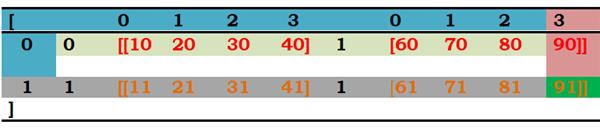
The first digit represents the first dimension, which contains two arrays
, since we selected 1, so we are left with the second array:
[11, 21, 31, 41] [61, 71, 81, 91]
The second digit represents the second dimension, we have two options
[11, 21, 31, 41] or [61, 71, 81, 91], as we selected 1 , so we are left with the array [ 61, 71, 81, 91].
At last, the third digit represents 3rd dimension, here elements have index from 0 to 3 and the elements have value
61,
71,
81,
91.
But we selected 3, and end up with a value 91.
Note:
If we want to access the elements of the array from the end of the array then we can use negative indexing.
NumPy Array Slicing:
Introduction:
- Slicing a NumPy array is similar to slicing a list. But NumPy array we can do slicing in more than one dimension.
- It returns a completely new list.
- The slice notation specifies a start and end value [start: end] & copies the list from start-up to but not include end.
- We can omit the start, in which case the slice starts at the beginning of the list.
- We can omit the end, so the slice continues to the end of the list. But if we omit both the start & end then it will return a copy of the entire list.
Note: Indexing & Slicing are not the same at all, index returns an element of the array but slice returns a list of elements. Let’s look at the code for better understanding.
List1= [10, 12, 13]

#indexing:

print(List1[0])

#output: 10


#slicing:

print(List1[0:1])

#output: [10]
Slicing 1-D NumPy Array:
Slicing 1-D NumPy array & a list is exactly the same. Let’s look at an example code:
import numpy as np

arr = np.array([10,20,30,40])

print(arr[0:2])

#output: [10,20]
Slicing 2-D NumPy Array:
We can slice a 2D array in both axes to obtain a rectangular subset
Of the original array.

For Example:
import numpy as np

arr =np.array([[10, 20, 30, 40, 50],[ 11, 22, 33, 44, 55]

[12, 24, 36, 48, 60],[ 13, 26, 39, 52, 65]] )

Print(arr[1: , 2:4])

#output: [[33,44],

               [36,48]

               [39,52]]
arr[1, 2:4] selects row 1 to the end of the bottom of array & column 2:4 i.e from index 2 to 4(excluding 4).
Slicing 3-D NumPy Array:
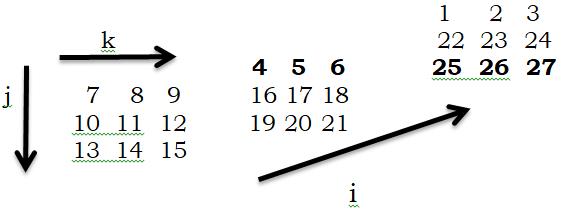
We can slice a 3D array in all 3 axes to obtain a cuboid subset of the original array, In 3D array, we have planes, rows, and column. Let's look at example code:
import numpy as np

arr= np.array([ [[7, 8, 9],[4, 5, 6], [1, 2, 3]],

                        [[10, 11, 12] , [16, 17, 18], [22, 23, 24]],

                        [[13, 14, 15] , [19, 20, 21], [25,26,27]]] )

print(arr[:2,1: ,:2 ])
#this will select planes:2 (first two planes), row 1: (the last two rows), columns:2(first two columns)
Full Slices:
We can use full slices to select all the planes, rows, or columns.
Thank you so much for reading this article, I just hope you like it if you find it useful then please do share with your friends. For more articles stay tuned with us.
Till now,
Happy learning.🙂🙂
