



How to unblock a number on an iPhone?
How to unblock a number on an iPhone?
Changed your mind about the number or person? and do you want to get the calls again from the number you blocked once? If yes, then now you can relax and you have arrived on the right page to get your answer here in this article I will tell you How to unblock a number on iPhone?
Read the whole article till the end and I will show you how to unblock a number that is saved and unsaved on an iPhone and how to unblock it don't skip any of the steps and keep following all to get full information.
How to unblock a saved number on iPhone?
This step is a little simpler and easier than the others. If you have saved the number of the person and want to unblock him/her now then you just have to unblock them from contacts.
STEPS
- For this firstly launch contact app on your iPhone
- Go to the search bar area and type the name through which you have saved the number and tap on the name after writing
- It will give you the full information of the person with number check once and at the bottom of all the information
- Scrolling down will give you the name like UNBLOCK THIS CALLER
- Tap on it and go for YES
- Once done the person can call or message you again and it will immediately unblock the saved block number
Now the main question is how to unblock the unsaved number?
Here is how to do read the whole
STEPS
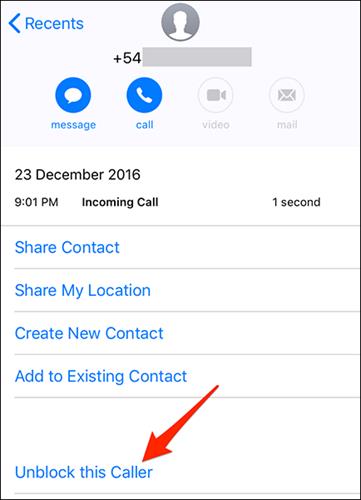
- If you haven’t saved the number on your phone so here your query will be solved go on your contacts and tap on recent which is present at the bottom of the end and there you will find so many numbers from which you have recently got the call.
- In front of every number, and I button is given
- Tap there
- This I button is going to give you the history and at the end, an option is there it is UNBLOCK THIS NUMBER tap on it and the rest procedure is the same as the saved number one it will be automatically saved
So this was all about the information of how to unblock someone on an iPhone do we hope this will make your process easier what are your thoughts on the same let us know in the comments section.
