



What is Azure Batch Service?
- Pre-requisite Knowledge –
Before we start with the understanding of what is Microsoft Azure Batch Service, we should know –
-
- Basic knowledge of cloud computing and its services
- Basic knowledge of Microsoft Azure
- Basic knowledge of Virtual Machine and Azure Storage
- Introduction of Microsoft Azure Batch Service –
Most of the enterprise and large applications run the lots of automated tasks at the background which can By anything like processing data, bringing new output, calculations, processing billing, testing software, etc. In such applications, it is equally important the role and design of high-performance computing (HPC) and run processes in parallel to get the job DONE.
Azure batch gives the power to you to use ‘Azure batch service’ which provides the facility to run the large-scale parallel and high-performance computing (HPC) batch jobs efficiently in Azure without capital investment. This service is recommended to use the large-scale execution and run the parallel tasks like Image analysis processing, Data injection, processing data, software test case execution and many more.
- How does it work?
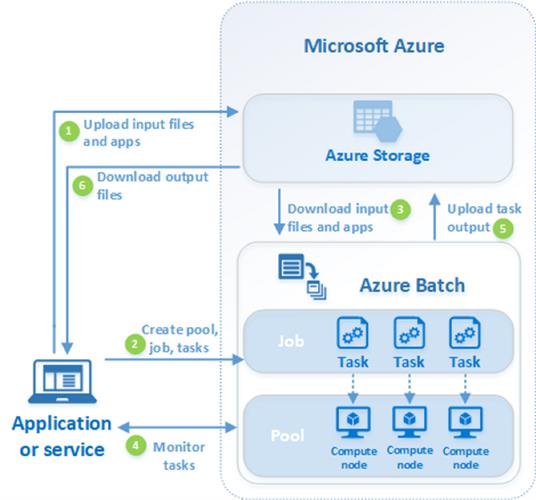
In short, this service creates and manages the pool of virtual machines which are called as compute nodes. We will install our application on this node and schedule the jobs to run on the nodes. We can Batch API and tools or command-line scripts or azure portal interface to configure, manage and monitor the jobs.

Image Source – Microsoft Docs
Need a Batch account to use the Batch service. Most Batch solutions also use an associated Azure Storage account for file storage and retrieval.
- Upload the input files and applications to process the input file into the Azure Storage account. These input files can be anything consisting of data to process it.
- Create a pool of nodes (virtual machines) to execute the processes. This also consists of the configuration of machines like O.S., size of nodes, etc.
Then, create a job and its associated tasks to perform the actions.
Azure batch service automatically schedules the job in the pool of nodes to execute it.
- Before executing the tasks, the service will download the files and applications from Azure storage to provide and execute the node.
- Once the job of execution of tasks is started then an application can connect to batch service and monitor the progress of execution over HTTPs.
- As the job completes Azure batch service upload the output to Azure storage. We can also fetch these output files from the node's directory file system.
- Then our client application can download the output files from Azure storage.
- Tangible benefits of Azure Batch Service –
- We have a choice of operating system to run parallel jobs and tasks.
- We can easily integrate the application with Azure batch service, schedule the jobs, make a queue of jobs, distributes the data, monitor the jobs, etc.
- The development has a choice of ways to implement the Azure batch service using various ways like Azure CLI, Azure portal, .NET, Python, etc.
- There is no additional charge for using Batch. It is paid as you use.
- We need to pay only for the underlying resources consumed, such as virtual machines, storage, and networking, etc.
- This is a cost-saver approach to run the jobs since we are paying the resource when it is in use rather than the whole infrastructure.
- We can implement the batch as a platform that can serve as software as a service to the users.
- We can control scale to meet deadlines and manage costs.
- Batch APIs and Tools
- Download batch explorer
- Reference Links –
- https://docs.microsoft.com/en-us/azure/batch/batch-technical-overview
- https://azure.microsoft.com/en-in/services/batch/
- https://cloudmonix.com/blog/what-is-azure-batch-service/
- https://docs.microsoft.com/en-us/azure/batch/batch-api-basics
- https://docs.microsoft.com/en-us/azure/batch/batch-apis-tools
- https://azure.github.io/BatchExplorer/
Conclusion - In this article, we have learned the overview of Microsoft Azure Batch Service.
