




What is Azure DevOps?
- Pre-requisite Knowledge –
Before we start with the understanding of what is Azure DevOps, we should know –
- Basic knowledge of source control like Team Foundation Server (TFS), Visual Studio Team Services (VSTS) or any other.
- Basic knowledge of cloud computing
- Basic knowledge of Microsoft Azure
- Background –
Most of the times project get delayed along with other factors like quality, reliability since in past there was no matured platform and model available for collaboration and coordination between the different teams like IT team, quality team, security team to work closely in the entire software life cycle.
It is indeed important to work together and closely with the different teams in the software project to deliver it more reliable and faster. Microsoft introduced the Azure DevOps to increase the coordination and teamwork across the different IT departments to reduce the time and getting a faster, continuous delivery process with high quality of the project. With the help of Azure DevOps, we can perform the end to end, an automated solution with security and monitoring.
- Introduction –
- In simple words – DevOps is the union of people, process and technology to enable continuous delivery of value to customers.
- It is an evaluation of Visual Studio Team Services (VSTS).
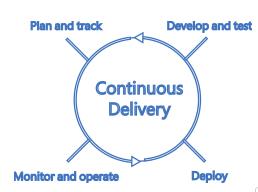
- DevOps has main principals for planning, tracking, development, test, build delivery and operations. It helps to automate the application life cycle with cut edge technology like a cloud.
- DevOps has built-in standards for reliability and security.
- It more focusses on putting efforts for developing the software application rather than building delivery pipelines, maintaining the infrastructure and security.
- Azure is the simplest way to develop and operate applications in the cloud.
- We can use the multiple tools to develop and deploy the application including open source.
- We can set up the CI/CD pipelines and manage the packages with Azure DevOps.
- Application monitoring can be done using Azure application insight.
- By using the Azure stack, we can have Azure DevOps server in our on-premise network too meaning run Azure DevOps in Microsoft cloud or in your own data center.
- Below picture taken from https://azure.microsoft.com/en-in/overview/devops/ explains DevOps in short –
- Azure DevOps Services –
- Azure pipelines –
-
- This service is used to continue to build, test and deploy the application.
- We can use any language and platform or any cloud. Dev Ops has advanced processed and features build chaining, multi-phased builds, test integration, etc.
- It has a flexible process for deployments to Kubernetes, VMs, Azure Functions, Azure Web Apps or any cloud.
- Azure Boards
-
- Azure board is used to monitor and track the work management.
- We can add Kanban boards, backlogs, dashboards and even create the custom reports.
- Users can easily drag and drop the objects in the Azure boards.
- Azure board has built-in scrum boards and planning tools.
- By using dashboards, we can run more insights to the work items.
- Azure Artifacts
-
- It has fully integrated packages with Maven, NPM, NuGet, and Python to CI/CD with one click.
- We can create and share the packages from public or private sources with your team.
- We can share the code easily and efficiently.
- It simplifies the complex build jobs with Artifacts.
- Azure Repos
-
- It is nothing but repository in the Azure cloud.
- Azure DevOps provides cloud-hosted, unlimited Git Repos and collaborates and builds the code with pull request and the code search feature (helps in finding and understand the classed and variables).
- It has support for any Git client to push the code into Git Repos.
- Azure Test Plans
-
- It helps in finding the defects of the application.
- By using the Azure test plan, we can test desktop and web applications, etc.
- We have the advantage of end-to-end traceability and quality for your stories and features.
- It has manual and exploratory built-in testing tools.
- Extensions Marketplace
-
- It is a great place where we can easily access and use the readymade service templates in our application.
- These are the extension to the Azure DevOps.
- Link is here to view the list of extensions.
- How to move from VSTS to DevOps?
- Users of the VSTS will be upgraded to the Azure DevOps projects automatically.
- URLs will change from visualstudio.comto dev.azure.com/abc.
- Users will have more choices and control over the process.
- There will not be any loss of functionality.
- Azure DevOps has all the integration as VSTS along with traceability.
- Reference Links –
- https://azure.microsoft.com/en-in/blog/introducing-azure-devops/
- https://azure.microsoft.com/en-in/overview/devops/
- https://azure.microsoft.com/en-in/services/devops/
- https://azure.microsoft.com/en-in/updates/introducing-azure-devops/
- https://azure.microsoft.com/en-in/services/devops/pipelines/
- https://azure.microsoft.com/en-in/services/devops/repos/
- https://marketplace.visualstudio.com/azuredevops
Conclusion - In this article, we have learned what is Azure DevOps and its services at a high level.
