

- Pre-requisite Knowledge –
Before we start with the understanding of what is Microsoft Azure front door, we should know –
- Basic knowledge of cloud computing and its services
- Basic knowledge of Microsoft Azure
- Basic Knowledge of internet facing web application
- Background –
In this article, we will explore a short explanation of the Microsoft Azure front door and its main services.
Before we look into what is Microsoft Azure front door, let's understand what is anycast-
Anycast –
- It is routing and addressing methodology.
- In this methodology, a single destination address has one or more routing paths to two or more destinations.
- Routers will decide and select the best path based on latency, lowest cost, distance, number of hopes, etc.
- It is used in a content delivery network to bring the information closer to the users.
- Introduction of Microsoft Azure Front Door –
- Microsoft Azure front door is used in a global web application to get secure, fastest delivery of content to the users.
- This service is recently generally available by Microsoft.
- It works on anycast methodology.
- The application will gain the speed of delivering the content with lower latency and higher throughput.

Image Source – Microsoft Docs
- By this service, we can define, monitor and manage the web traffic routing for better performance and high availability.
- Front Door works at Layer 7 or HTTP/HTTPS layer and uses anycast protocol with split TCP and Microsoft's global network for improving global connectivity.
- It provides a range of routing models and health monitoring options based on our needs.
- This service is useful for delivering consistent, low latency, high throughput, DNS based routing, load balancing, building highly scalable applications, Global HTTP load balancing with instant failover.
- We can perform URL based routing, session affinity, configure SSL, application-level security and URL rewrite.
- Microsoft providing the 99.99 percent availability SLA.
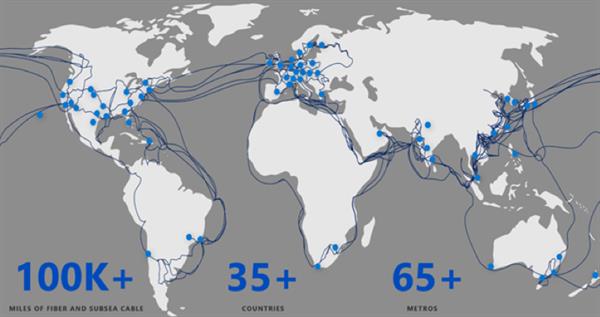
- AFD provides global coverage in over 35 countries across 65 metros and quickly growing.
- AFD can effortlessly integrate with existing or new applications without box.
- Microsoft Documentation
- Pricing – Pay as you use
- Reference Links –
- https://azure.microsoft.com/en-in/blog/azure-front-door-service-is-now-generally-available/
- https://docs.microsoft.com/en-us/azure/frontdoor/
- https://docs.microsoft.com/en-us/azure/frontdoor/front-door-overview
- https://azure.microsoft.com/en-us/services/frontdoor/
- https://en.wikipedia.org/wiki/Anycast
- https://azure.microsoft.com/en-gb/services/frontdoor/
Conclusion – In this article, we have learned the overview of Microsoft Azure front door and its services.