Python

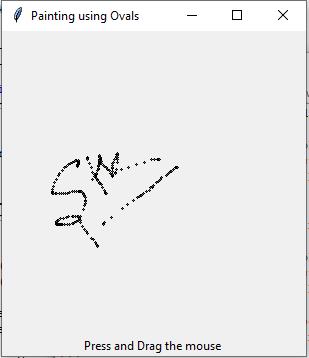
Painting Interactively into a Canvas Python

Painting Interactively into a Canvas Python
from tkinter import *

canvas_width = 300
canvas_height = 300

def paint( event ):
   python_green = "#476042"
   x1, y1 = ( event.x - 1 ), ( event.y - 1 )
   x2, y2 = ( event.x + 1 ), ( event.y + 1 )
   w.create_oval( x1, y1, x2, y2, fill = python_green )

master = Tk()
master.title( "Painting using Ovals" )
w = Canvas(master, 
           width=canvas_width, 
           height=canvas_height)
w.pack(expand = YES, fill = BOTH)
w.bind( "<B1-Motion>", paint )

message = Label( master, text = "Press and Drag the mouse to draw" )
message.pack( side = BOTTOM )
    
mainloop()


Sarthak Varshney

Sarthak Varshney is an author and software developer and His rich skill set includes developing and managing IT/Web-based applications in different technologies, such as – VMware Cloud, VMware Horizon, vROPs, vRLI, SRM, Cloud Computing, AWS, Microsoft Azure, IBM Cloud, Big Data, Hadoop, Docker, Kubernetes, JavaScript, ASP.NET Using C#, to SQL Server, HTML 5, Bootstrap, Angular JS, and Android Application Sarthak possesses a Master’s of Computer Application and has been actively contributing to the development community for its betterment and improve the knowledge