
Blazor

How do you change the default icon provider in a Blazor app?

How do you change the default icon provider in a Blazor app?

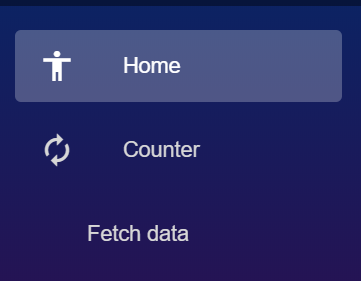
You can change the default icon provider for Blazor by importing the required icons in the site.css (\wwwroot\css\site.css). The imported icons can be used throughout the application. In the sample, I’ve imported the Material theme icons and used them.

[site.css]

@import url('https://fonts.googleapis.com/icon?family=Material+Icons');
[~/Shared/NavMenu.razor]

<li class="nav-item px-3">
     <NavLink class="nav-link" href="" Match="NavLinkMatch.All">
          <i class="material-icons"> accessibility </i>Home
     </NavLink>
</li>
<li class="nav-item px-3">
      <NavLink class="nav-link" href="counter">
           <i class="material-icons">autorenew</i> Counter
      </NavLink>
 </li>
<li class="nav-item px-3">
      <NavLink class="nav-link" href="fetchdata">Fetch data
      </NavLink>
</li>

In the sample, we have changed the default icons to the Material icons for the home page and counter.
Nitin Pandit

With over 10 years of vast development experience with different technologies, Nitin Pandit is Microsoft certified Most Valued Professional (Microsoft MVP) with a rich skillset that includes developing and managing IT/Web-based applications in different technologies, such as – C#.NET, ADO.NET, LINQ to SQL, WCF, and ASP.NET 2.0/3.x/4.0, WCF, WPF, MVC 5.0 (Razor), and Silverlight, along with client-side programming techniques, like jQuery and AngularJS. Nitin possesses a Master’s degree in Computer Science and has been actively contributing to the development community for its betterment. He has written more than 100 blogs/articles and 3 eBooks on different technologies to help improve the knowledge of young technology professionals. He has trained more than one lakh students and professionals, as a speaker in workshops and AppFests, conducted in more than 25 universities in North India.