

HOW TO GET GOOGLE’S WEATHER APP ON YOUR ANDROID PHONE?
Are you too looking up to the sky for every second information of the weather forecast?
What if I tell you can do your favorite activities or can go for a walk without holding an umbrella because after reading this article you will learn the steps how to download the google weather app on your android phone yes you heard it right you can do this in your android phone although Google does not have any official recognize weather forecast app in play store in this article, I will make you learn how to add google weather forecast in your home screen of android phone. Read the whole article to know till the end don’t skip it in between.
STEPS FOR ADDING GOOGLE FORECAST TO YOUR SCREEN
This weather forecast is a very very important thing if you are heading out from home and it is present in the google app so all the steps can only be learned if you have installed google app in your android phone if it is there you can directly go for steps but if not then download google app from play store app first
Head out for the google app on your phone.
After opening tap on the SEARCH button.
Now tap on TYPE and type WEATHER in the search box from the results.
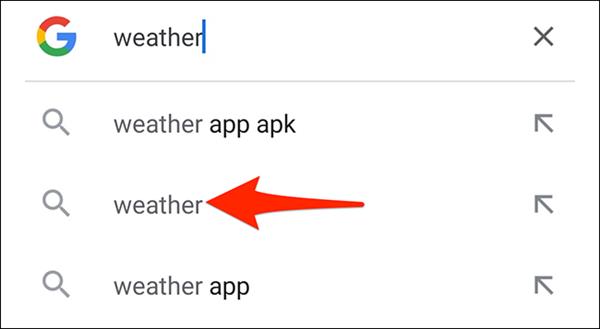
If your location is open you will find the current location of your area but if not no worries still you will get the current weather updates.
On the phone screen on the right, you will find a 3- dot menu headed out for these three dots.
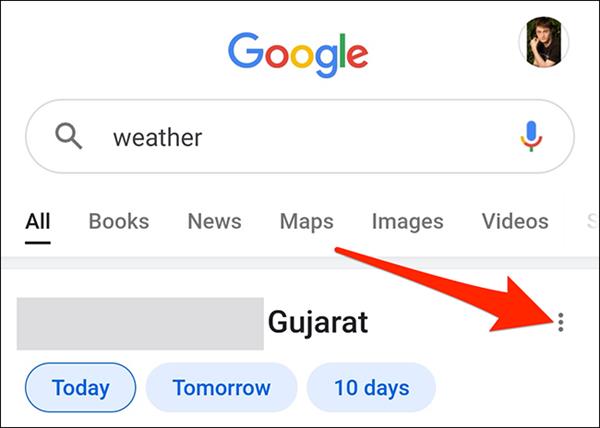
It will give you the option for adding it to the home screen tap on the sentence.
Now there will be a pop-up sun icon that will appear on your display. You can display it anywhere you wish to at the starting or the end or if you want you can put it into a separate folder. After this tap on AUTOMATICALLY ADD in the app.
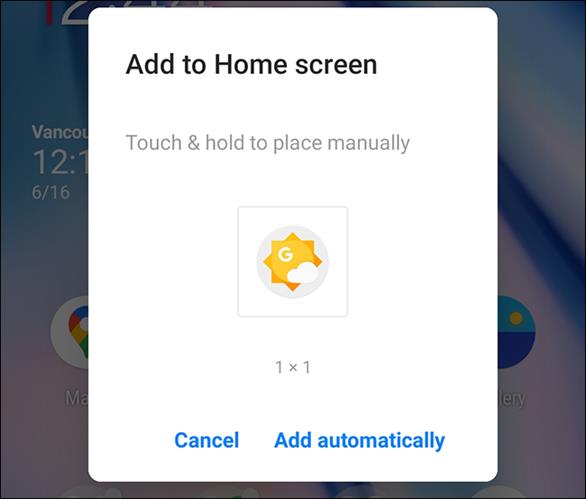
Now you have successfully added a weather forecast screen to your display.
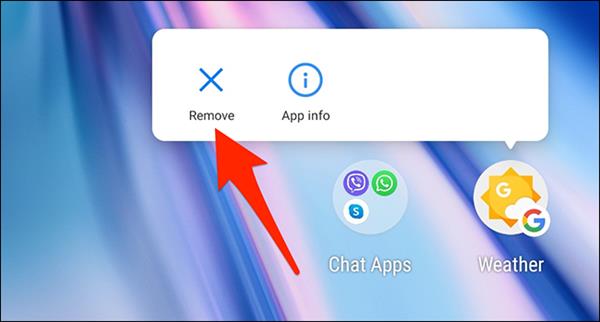
You can remove this icon permanently from your screen by holding it for 2 seconds it will show the remove options select that and it will be removed from your screen you can again add I to our screen anytime.
This was all about the downloading of the weather app to your screen we hope this article will help you what are your thoughts on this let us know in the comments